Pastor Access
In most cases pastors of churches in the South Pacific Division can set up their own access to Adventist Place. Your Adventist Place account can have as many churches as you pastor attached to it and will update should you move church.
The only need is for your ACMS record to be up-to-date at your Conference/Mission. If it is accurate, you will automatically be associated with all the churches you service and thus also have those churches in your Adventist Place account.
NOTE: If your ACMS record does not list you as the pastor of the correct church your Adventist Place account will not be connected to your correct churches. Simply contact your Conference/Mission and ask to have your ACMS record updated. Then, by next day, the changes to your leadership locations will flow through and your access to the correct churches will be available in Adventist Place.
To gain first-time access to your Adventist Place as a Pastor:
- Go to https://app.adventist.place/users/password/new
- Enter the Email address your ACMS record will have on record, and click Reset Password
-
Check your email for a reset password email from Adventist Place
(Email didn't come? Wait up to 5 minutes for it to arrive, and check you spam. If it doesn't turn up, maybe you entered the wrong email on record in ACMS, or you are not set as being associated with any churches in ACMS - contact your Conference to check your email and what churches you are connected to)
- Click the Change my password button in the email
- Enter your New password, and enter it again to confirm your new password, and click Change my password
-
You'll then be signed in to Adventist Place automatically after setting your password. Remember your password for quick login next time.
To quickly access Adventist Place AFTER your first-time login:
- Go to Adventist.place and click 'Login'
- Enter the email and password you set
Multiple Churches?
Your single pastor login gives you access to every church attached to your name in ACMS.
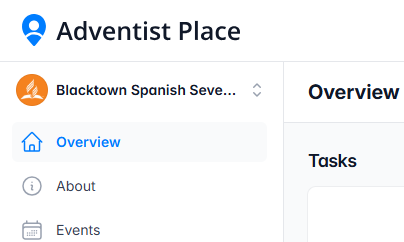
To switch churches when logged in, go to the church name up the top left of your menu.
Moving Churches?
If you're moving or gaining another church to minister to, updating your ACMS record via the Conference will change the churches you have access to automatically.
Granting access to other church members
Perhaps you need to give access to a webmaster or other role, as Pastor you can give and take away access to Adventist Place.
To re-invite a webmaster who managed an Adventist Place website before August 2026:
- Login in to Adventist Place, and go to People
- Find the individual and click on their name to open their overview
- Click User Access
- Click Reinvite (or invite) to send them an invitation email, which expires in 30 days.
To add a person who has not had access before:
Follow the instructions on this page
Stuck?
If there's reasons the above is not working for you, contact us and we'll help access to your Adventist Place get opened up to the correct people.